Studio Notes
Four AI Models Said Our Open Gate Was Closed. So We Trained Our Own.
Local vision models called our open beach gate closed, so we trained a tiny classifier on one scene and let Home Assistant alerts collect the corrections.

Saturday, September 26, 2026 • Code Puerto Rico, San Juan
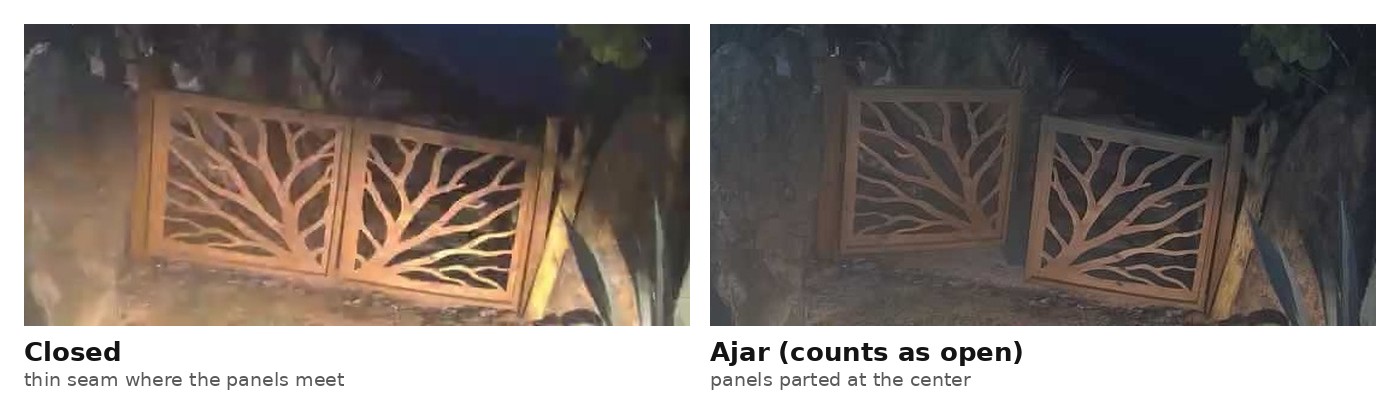
Four of the five local AI vision models we tested side by side looked at our beach gate standing ajar and said it was closed. They gave nearly the same reason: the panels were “parallel and flush.” What runs today is a 6 MB classifier fine-tuned on this one gate and wired into Home Assistant, so every alert on my phone can double as a training label. It still makes mistakes, and I’ll show you those too.
¿Abierto o cerrado?
A camera already watches the gate at a property in Río Grande. I wanted the house to notice when someone leaves the gate open and tell me. The obvious first try was an off-the-shelf vision-language model, an AI that answers questions about images.
On September 3 we ran a quick check with five freely downloadable (open-weight) models through Ollama, which runs models locally, on our GPU workstation (an NVIDIA RTX 4090 we already use for video work). Each got the same crop and the same prompt, not tuned per model, which told them to say open only when the panels were clearly apart. They saw two frames: the gate closed in daylight and ajar at dusk. Four of them (qwen3.5:9b, qwen3.8:27b, qwen3-vl:4b and mistral-small3.1) got the closed frame right and called the ajar one closed. The fifth, moondream:1.8b, gave no usable answer.
One very large cloud model, qwen3.5:397b on Ollama Cloud, did catch the ajar frame. We ran it in production for about a day, asking it three times per check and going with the majority. Two frames is not a benchmark, and we never tested that model on our full photo set. Still, I wanted the decision made inside the house, not by three cloud calls every check.
A small model for one scene
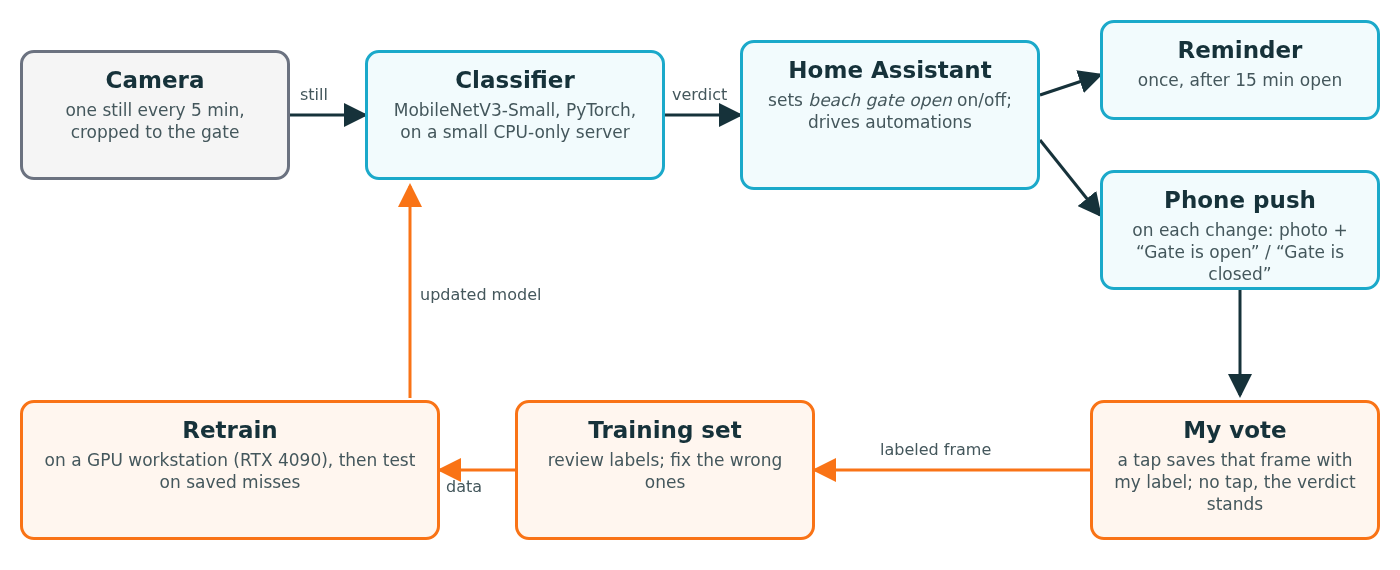
So we trained a classifier. It is MobileNetV3-Small, a compact image network pretrained on ImageNet, fine-tuned in PyTorch to answer a single question. We chose it because it is small enough to run without a GPU. A first version went live September 5. The one we ran until September 25 was retrained September 6 on 108 labeled frames and got 21 of 22 held-out images right. Held-out images are photos kept out of training to test the model. Only 6 of those 22 show the gate open, so the score says less than it seems.
Training happens on the 4090: the September 25 run took 16.5 seconds wall-clock (40 passes over 120 photos, start-up included). The day-to-day checks run on a small CPU-only server; the workstation is needed elsewhere. Every five minutes the server grabs a still, crops it to the gate and classifies it. Each check takes about six seconds, model loading included.
Home Assistant closes the loop
The classifier’s verdict flips a switch in Home Assistant, the open-source platform that already runs our lights, AC and cameras. If the gate reads open for 15 minutes, Home Assistant sends a reminder.
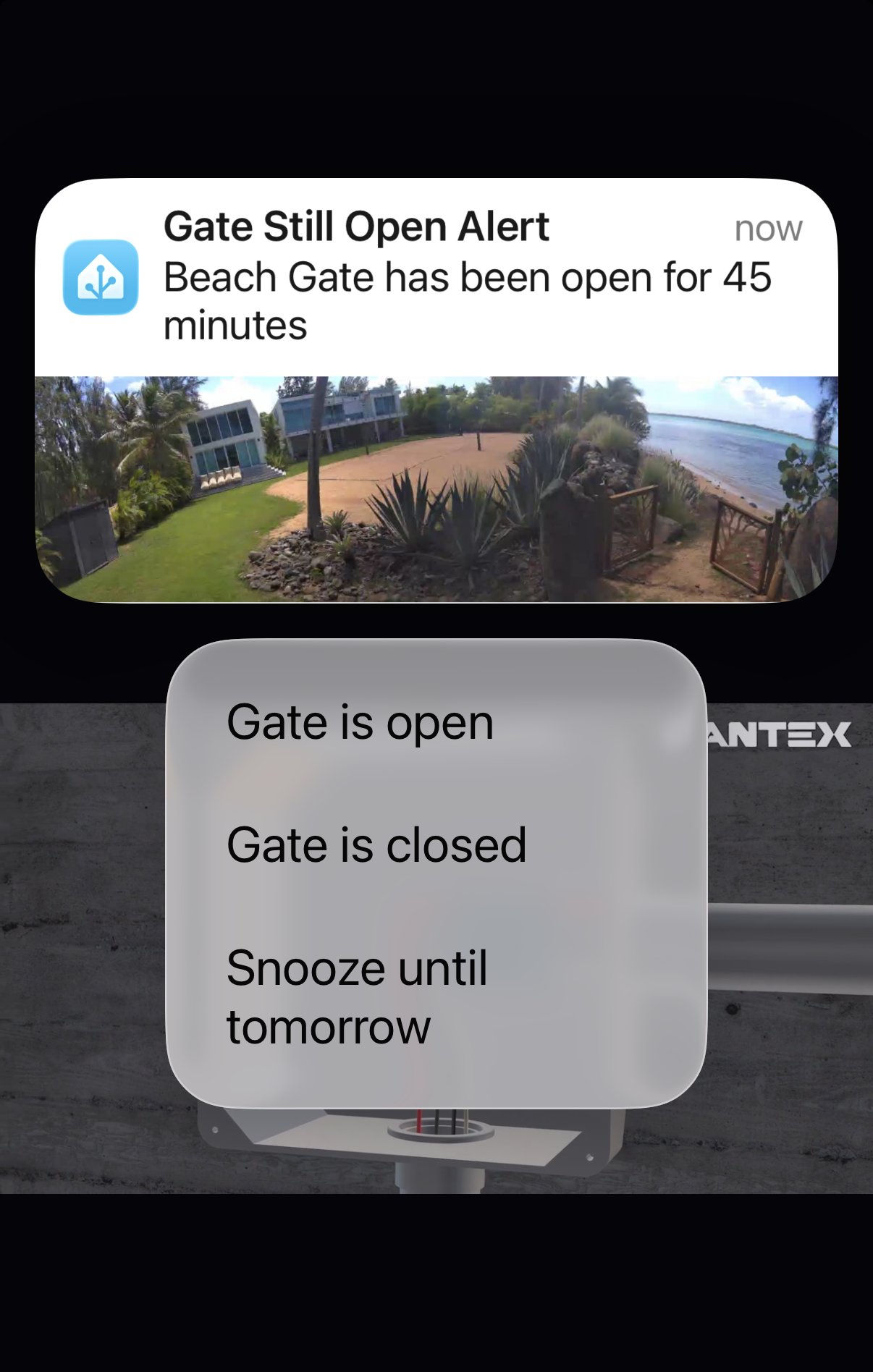
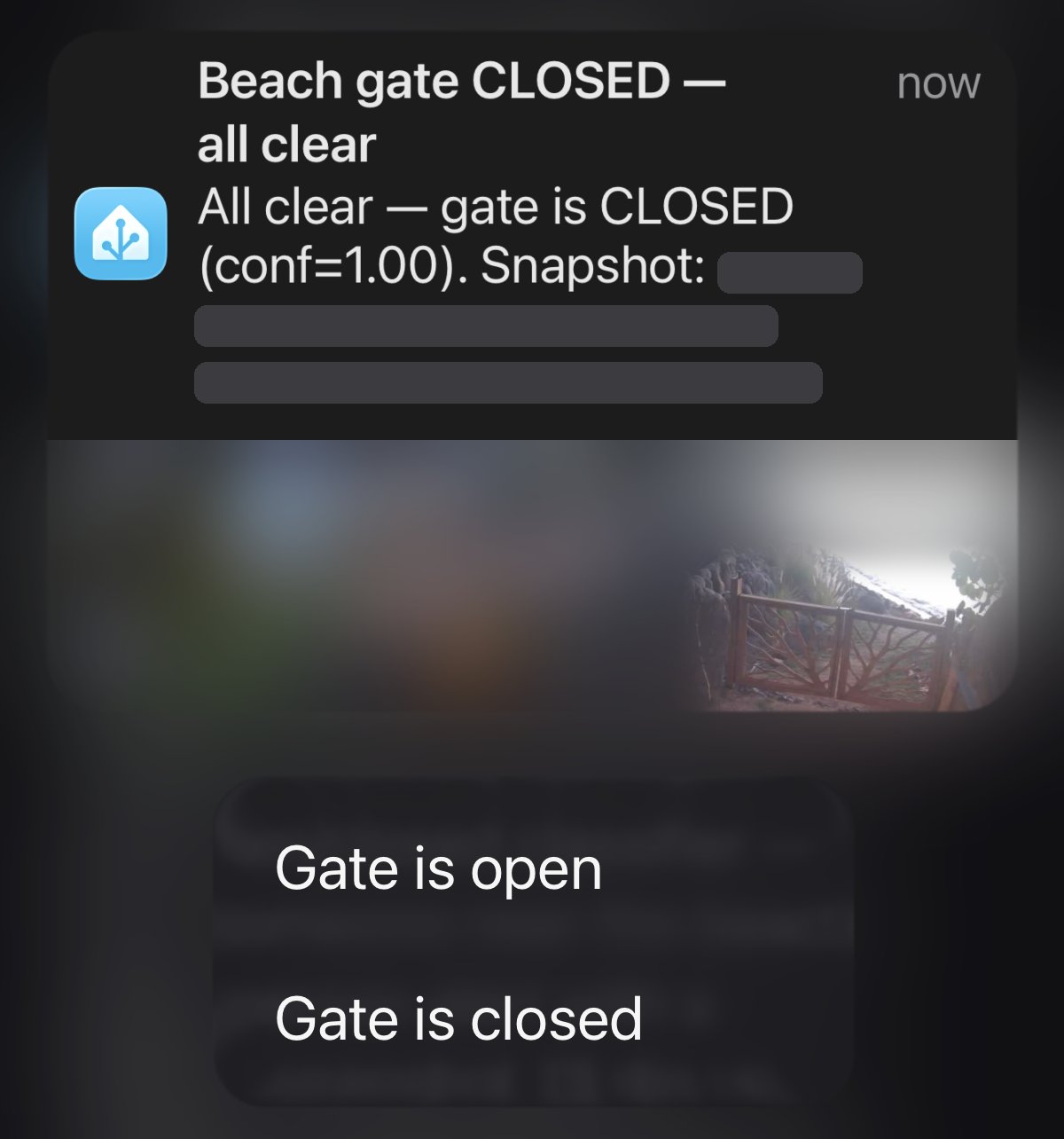
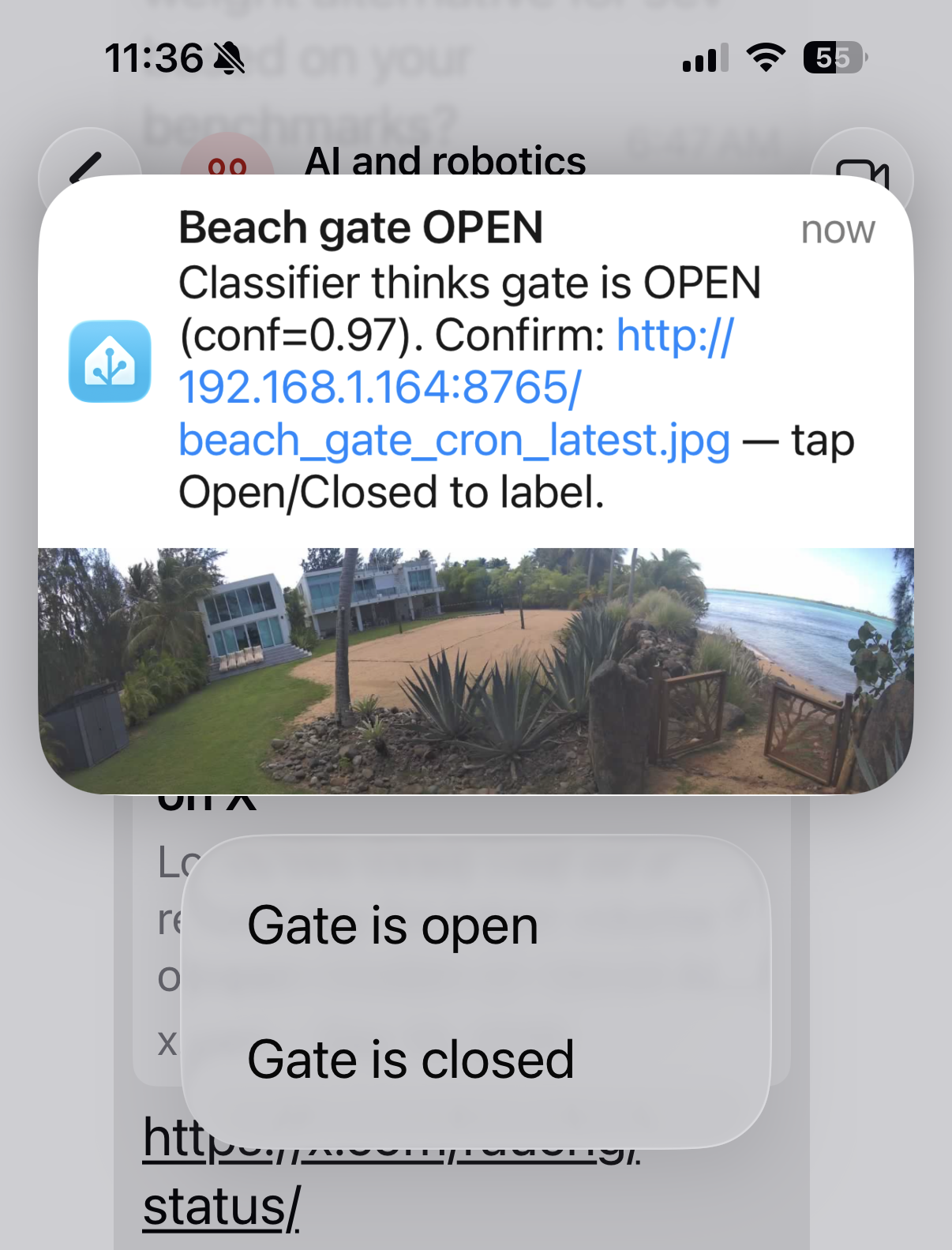
Each time the verdict changes, my phone gets a push with the photo and two buttons: “Gate is open” and “Gate is closed.” A tap saves that frame, with my label, for the next retrain. If the gate flips to closed and I tap “Gate is open,” the frame becomes an open example and the alerts keep coming until I tap “Gate is closed.” If I ignore an alert, the verdict stands and the alerts stop. As of September 25, a vote only counts if it arrives within about 20 minutes of the photo. The catch: I can only correct the model when it changes its mind. A gate it wrongly calls closed sends no alert, as I found out.
The miss, and my own bad labels
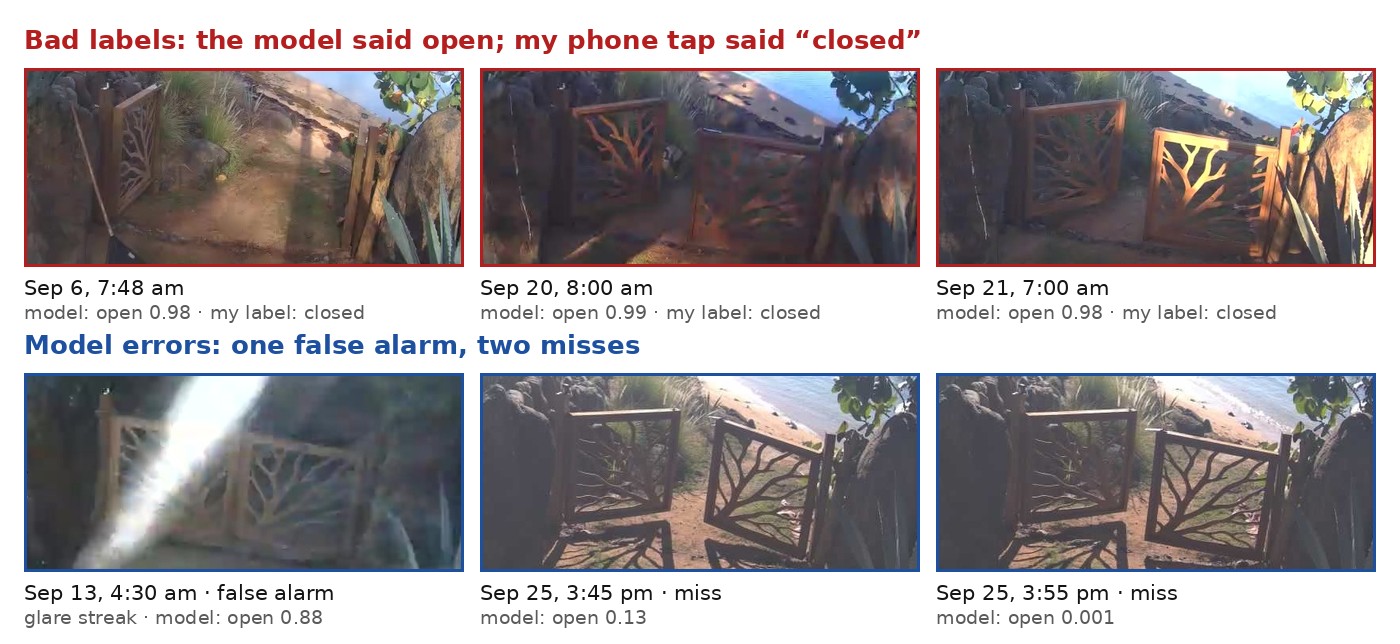
On September 25 I left the gate open for about 18 minutes one afternoon and got no alert. In low afternoon sun and hard shadows, the model gave three open frames an open score (0 to 1, where 0.5 or more means open) of 0.13, 0.001 and 0.001. That is a miss, or false negative. The opposite error, calling a closed gate open, is a false alarm (false positive).
Reviewing every labeled photo that day turned up a second problem: me. Three frames I had tapped “Gate is closed” clearly show the gate open. The model had called all three open, with scores of 0.98 to 0.99. My taps came seven hours to four days later. I was probably describing the gate as it was when I tapped, or reading “Gate is closed” as “I closed it.” One of those labels went into the September 6 retrain, and that model learned my mistake: it scored that wide-open frame 0.00.
My labeling page shows each alert frame with the model’s guess, my label, and Open and Closed buttons to change it.

Then a surprise: rerun on those three frames, our first model, from September 5, scored them 0.99, 0.55 and 0.55. Did my bad label break the retrain? I can’t show that. Retraining on the same photos with different random starting points swung the scores from near 0 to 0.8, and removing the label didn’t reliably help. One training run proves little.
We fixed the three labels and added 11 hand-checked frames, for 150 labeled photos in all (63 open, 87 closed). We also used augmentation, adding altered copies of training photos with fake sun glare, hard shadows and tilted angles. Then we retrained. The table compares the two models, rerun from their saved files.
| What we tested | Sep 6 model | Sep 25 model |
|---|---|---|
| The original 22 held-out images | 21 of 22 right | 21 of 22 right |
| The 3 afternoon misses | 0 of 3 caught | 3 of 3 (it trained on them) |
| The same 3, model trained without them | – | 1 of 3 caught |
| False alarms, 789 frames believed closed (Sep 23–25) | 0 | 0 |
In production, scores under 0.6 are marked unknown; that changes no result here.
Held-out accuracy didn’t move, and both models still miss a night frame with a person standing in the open gateway. The retrained model catches the September 25 misses mostly because it has seen them; with them held out, it caught one of three. Our test scores also flatter the model: some test photos are near-twins of training photos taken minutes apart. The fix is more afternoon examples, which the phone votes can now supply.
What anyone using AI can take from this
- Test before you trust. A two-frame test told us more than any model card.
- Go small and specific when the camera never moves and the question never changes.
- Audit your labels. Ours had errors, and the button wording invited them. Next step: “Photo shows open / closed.”
- Hold out your failures, and retrain more than once, or you’re grading your own homework.
- Connect the model to something real. Home Assistant is what turns a score into a reminder, and a reminder into new training data.
Test, measure, fix the data, ship, repeat: that loop is applied AI, and it’s the habit we build at Holberton Coding School Puerto Rico, Code Puerto Rico’s school, through its AI Software Engineering program and the part-time AI for Developers program for working developers. Ask us about the gate at the Holberton Coding School Puerto Rico booth at the Caribbean AI Summit, October 9–10 at the Puerto Rico Convention Center.
Follow Code Puerto Rico on Instagram: @code_puertorico